
ECM Security in 2026 Zero Trust
Enterprise content management (ECM) security is no longer just a “check-the-box” IT function. In 2026, document repositories have become a primary attack surface, a compliance liability, and a decision-making data source for AI tools. The business pain is familiar: sensitive files shared too broadly, audits that take weeks, version confusion across teams, and workflow bottlenecks caused by “security vs productivity” tradeoffs.
Zero Trust changes the question from “Who is inside the network?” to “Should this identity have access to this document, for this action, right now?” That mindset is exactly what modern enterprise document management needs—especially when documents move across departments, vendors, and regulated processes.
Definition: What is Zero Trust ECM security?
Zero Trust ECM security is a document security approach where access is continuously verified and enforced at the user, device, session, and document level. Permissions are least-privilege by default, policy-driven, audited, and designed to support secure internal collaboration and controlled external sharing.
Why this matters today
Buyer expectations have shifted. Security leaders, compliance owners, and operations teams want systems that reduce risk without slowing down the business. In 2026, the pressure comes from four directions:
Answer block: Why Zero Trust matters for enterprise document management
Because documents contain contracts, customer data, HR records, and regulated evidence. Zero Trust prevents “broad access” from becoming the default, while still enabling workflow automation and collaboration with clear accountability.
Key challenges in ECM security (2026 reality)
Most ECM security failures are not caused by “bad encryption.” They are caused by misaligned process, weak governance, and inconsistent structure—especially when documents pass through multiple workflows.
Risks of doing nothing
“Doing nothing” usually means continuing with shared drives, loosely governed folders, and ad-hoc permissions—while expecting people to behave perfectly. In 2026, that gap compounds quickly.
- Higher probability of data exposure through oversharing, misrouting, or compromised accounts.
- Audit costs rise due to manual evidence collection and unclear version history.
- Operational drag from rework: wrong templates, outdated approvals, missing attachments.
- Vendor and customer trust erosion when you cannot demonstrate control.
- AI initiatives stall because content isn’t structured enough to be safely searchable.
Deep-dive: how security problems break real workflows
Security issues rarely show up as “security issues.” They show up as broken work. Below are common workflow points where ECM security fails—and how that failure becomes a business incident.
Teams reuse old documents because they can’t find the approved template. That leads to missing clauses, outdated terms, and non-compliant language. In Zero Trust terms, the problem is not “search,” it’s lack of structured metadata and lifecycle controls.
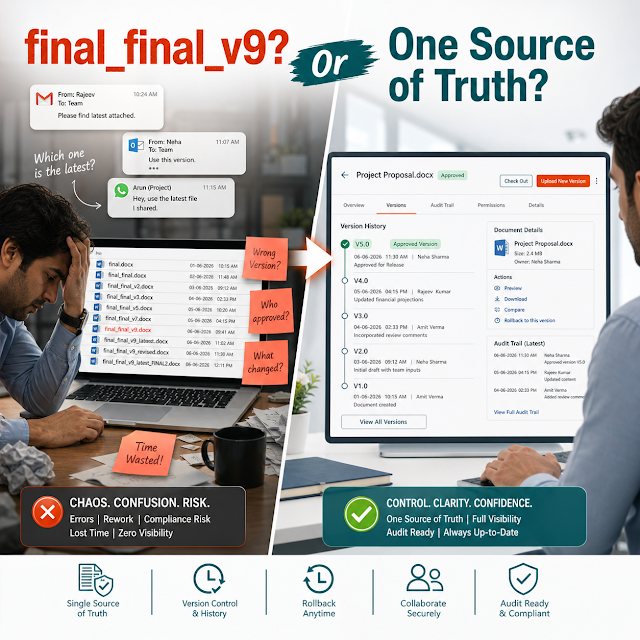
Approvals happen in email threads, chat messages, or verbal sign-offs. Later, nobody can prove who approved what, when, and under which version. Attackers and auditors love this gap because it undermines accountability. A secure ECM workflow should bind approvals to a specific version and preserve a tamper-evident trail.
The fastest path becomes the default path: email attachment, public link, or untracked download. If a partner forwards the file or stores it in an unmanaged system, your organization still owns the risk. Zero Trust requires controlled sharing: time limits, view-only options, watermarking, and revocation.
When files are scattered across folders and personal drives, legal hold and retention become manual. People guess what to keep. Audits become a scramble to collect evidence from multiple systems. A modern approach makes retention policy-driven and provable.
Answer block: How Zero Trust helps day-to-day work
It reduces reliance on memory and informal approvals by enforcing access and workflow rules directly in the ECM system. Users move faster because the “right next step” is built into the process, and security is applied automatically.
Solution approach: structured document management with Zero Trust controls
In practice, Zero Trust ECM security is not a single feature. It is a system design approach built on structure, governance, and enforceable workflow. A ShareDocs-style document management strategy focuses on:
- Structured repositories that mirror how the business operates (department, process, project, case, client).
- Metadata standards so policies can be applied consistently (confidentiality, retention class, owner, status, contract type).
- Role-based access control aligned with business roles, not ad-hoc exceptions.
- Workflow automation that enforces approvals, segregation of duties, and version governance.
- Audit-ready evidence with complete traceability (who, what, when, which version, which workflow step).
If you want to align teams around an ECM modernization plan, start with a clear inventory of content types, risks, and access patterns. Then implement policy controls where they matter most: external sharing, approvals, and sensitive repositories.
For more context on ShareDocs and document control, you can explore internal resources on ShareDocs: https://sharedocsdms.com/
Feature breakdown (what to look for in a Zero Trust-ready ECM)
The goal is to reduce risk while improving speed and consistency. Below are high-value capabilities buyers should evaluate for enterprise document management and compliance document management.
Comparison: legacy ECM mindset vs Zero Trust ECM mindset
This shift is not only technical; it’s operational. Here’s what changes when you move from perimeter-based assumptions to Zero Trust controls in content operations.
- Assumes internal users are trusted once logged in.
- Broad folder permissions to “keep work moving.”
- External sharing happens outside the ECM.
- Audit data exists but doesn’t reflect workflow steps.
- Retention policies are inconsistent or manual.
- Continuously verifies identity and enforces least privilege.
- Policy-based permissions tied to roles and metadata.
- Secure external sharing is built-in, governed, and revocable.
- Audit trails are workflow-aware and exportable for compliance.
- Retention and legal hold are standardized and provable.
Industry use cases (realistic scenarios)
Zero Trust ECM is not one-size-fits-all. The most effective deployments focus on the content types with the highest risk, highest audit frequency, and highest operational friction.
Need: Strict access by role (front desk vs billing vs clinicians), secure sharing with partners, and audit-ready logs.
Need: Version governance, controlled approvals, and proof of compliance during ISO/customer audits.
Need: Client-level segregation, secure external sharing, and fast retrieval with reliable metadata.
Need: Field-friendly access, strict permission boundaries by project, and a clear “single source of truth.”
Need: Highly restricted access, retention rules, and demonstrable controls for sensitive content.
Need: Role-based enforcement, strong audit trails, and consistent records management.
Implementation perspective (what a practical rollout looks like)
A Zero Trust ECM rollout succeeds when it is treated as an operational improvement program—not just a repository migration. A pragmatic approach typically follows these phases:
Business impact and ROI (what executives care about)
The ROI of Zero Trust ECM security is measurable. It shows up in faster cycle times, fewer audit hours, reduced rework, and fewer high-cost incidents. Consider these impact categories:
Future-readiness: Zero Trust + AI-enabled content operations
AI is forcing a hard truth: your organization will only get safe value from AI search and AI assistants if your content is structured, permissioned, and governed. In other words, the same foundations needed for Zero Trust are also the foundations needed for AI-enabled content operations.
Definition: What are AI-enabled content operations?
AI-enabled content operations are processes where AI helps users find, summarize, classify, and route documents faster. The key requirement is that the AI respects security boundaries, uses accurate metadata, and relies on authoritative versions of documents.
If the ECM system doesn’t enforce least privilege and strong governance, AI amplifies mistakes. If it does, AI becomes a force multiplier: faster retrieval, better routing, and more consistent compliance execution.
Related reading on ShareDocs (internal): https://sharedocsdms.blogspot.com/
FAQ
If your teams rely on shared drives, uncontrolled links, or email approvals, you’re carrying avoidable risk and avoidable operational cost. ShareDocs helps organizations structure document management, secure workflows, and build audit-ready compliance document management—without slowing down day-to-day work.