Top Document Management Software India 2025 explained for modern businesses with practical use cases, risks, and ways to improve control, complianc...
Top Document Management Software India 2025, best DMS in India, enterprise document management system, document control software, compliance document management, ISO 9001 document control, audit trail, version control, document workflow automation, secure document storage, AI search for documents, AI-enabled content operations, ShareDocs document management.
Top Document Management Software India 2025
Buyer intent summary (2025)
If your teams waste time searching, re-creating files, chasing approvals, or failing audits due to messy document versions, a modern Document Management System (DMS) is now operationally essential—not optional.
This guide explains what to evaluate in India in 2025: security, compliance, workflow automation, AI-ready search, scalability, and implementation outcomes.
Across Indian enterprises and fast-growing mid-market companies, document chaos shows up in predictable ways: missed SLAs because a team used an outdated template, delayed payments because invoices are trapped in email threads, audit stress because you can’t prove who approved what, and customer frustration when you cannot retrieve signed documents instantly.
The real cost is not only storage—it’s lost productivity, preventable risk, and slower decisions.
In 2025, “top document management software” means more than a folder system. Buyers expect structured document control, fast retrieval, strong access controls, automated approvals, audit trails, retention rules, and integration with daily tools (ERP/CRM/email).
And increasingly, they expect the system to be AI-search ready—because users now ask questions, not just keywords.
What is document management software?
Document management software is a system that stores documents securely, organizes them with metadata, controls versions, routes approvals, and maintains audit trails so teams can find the right document fast and prove governance.
Why it matters in 2025 (India)
Regulations, audits, data security expectations, and distributed workforces require controlled access, traceability, and reliable retention. Buyers also expect faster turnaround with automated workflows and AI-assisted retrieval.
How structured DMS helps
A structured DMS enforces naming, metadata, version control, and permissions while automating routing and approvals. It reduces rework, shortens cycle time, and strengthens compliance with consistent evidence.
Why this matters today: AI search, compliance, scale, and buyer expectations
Document operations sit underneath every department: finance, HR, legal, procurement, sales, engineering, quality, and customer support. As organizations scale, the volume and sensitivity of documents increase—and so does the cost of weak control.
In India, many businesses are simultaneously dealing with fast growth, vendor ecosystems, multi-location operations, and evolving governance requirements.
- AI search changes user behavior: people want to ask “Where is the latest vendor contract with SLA clause?” not “contract_final_final2.pdf”.
- Compliance expectations are rising: audit trails, retention rules, and controlled access must be demonstrable, not assumed.
- Scale magnifies small inefficiencies: even a 2-minute search delay becomes thousands of hours annually across teams.
- Buyers expect integration and workflow: approvals should not live in email; documents should flow with business processes.
Key challenges when choosing document management software (India)
Most DMS projects fail or underdeliver because the organization buys “storage” instead of “process control.”
Below are the most common challenges Indian organizations face—presented in a practical, buyer-focused way.
1) Version chaos & approval ambiguity
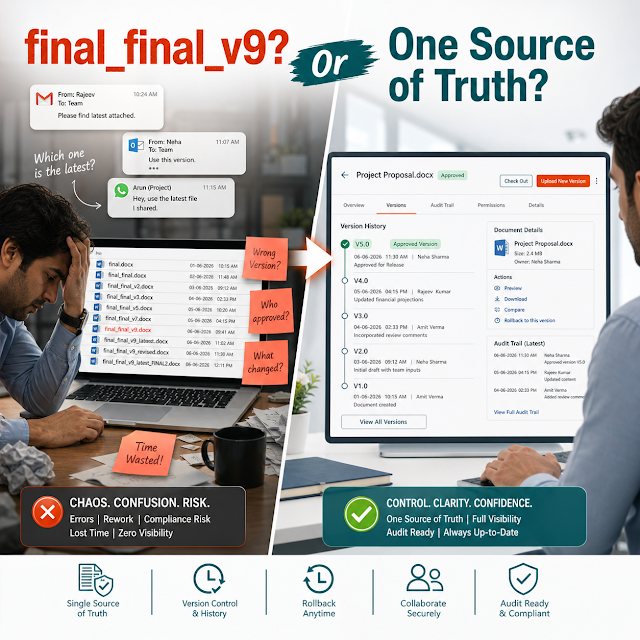
Teams share drafts in email/WhatsApp and lose track of “approved vs in-progress.” Without check-in/check-out, version control, and e-sign or approval logs, errors become inevitable.
2) Weak search due to poor structure
If documents aren’t tagged with consistent metadata (department, project, vendor, policy type, effective date), search becomes guesswork and rework increases.
3) Security gaps & uncontrolled sharing
Sensitive documents get forwarded outside the organization. A modern DMS must enforce role-based access, watermarking (where required), and controlled external sharing.
4) Compliance & audit-readiness
Audit teams need evidence: who uploaded, who approved, what changed, and what was active on a certain date. Missing logs create costly audit friction.
5) Workflow automation mismatch
Many tools offer “workflow” but can’t match real routing: parallel approvals, escalations, delegation, SLA alerts, and department-specific rules.
6) Change management & adoption
If users find it slower than email, they won’t use it. The right DMS needs intuitive UI, clear governance, and practical templates for metadata and folder structures.
Risks of doing nothing (or staying on shared drives)
When organizations delay a structured document management approach, the immediate pain may feel manageable—but the hidden risk accumulates. Here’s what “no change” typically leads to:
- Operational waste: repeated searching, duplicate work, and “recreating lost files.”
- Decision delays: approvals slow down because stakeholders don’t trust the current version.
- Security incidents: unauthorized sharing of contracts, HR files, financial reports, and customer data.
- Audit risk: inability to prove who approved what, when a policy was effective, and what changes occurred.
- AI readiness gap: unstructured documents are difficult to index meaningfully, limiting AI search and automation value.
Deep dive: how document problems break real workflows
Document management is not a “back-office IT tool.” It directly impacts cycle times and customer outcomes. Below is how typical breakdowns occur in everyday processes:
Procurement & vendor onboarding
Vendor KYC documents, quotations, approvals, and contracts are often scattered across email and spreadsheets. The result is slow onboarding, compliance gaps, and inconsistent terms. A DMS with metadata (vendor ID, category, validity dates) makes retrieval and renewals predictable.
Finance: invoice processing & audits
Invoices require matching with PO, GRN, and approvals. If supporting documents aren’t linked and searchable, payments get delayed and vendor relationships suffer. Audit teams then spend days sampling and reconciling paper trails.
HR: employee lifecycle documentation
Offer letters, policies, KYC, appraisals, and exit documents need strict access controls. Without role-based security and logging, confidentiality risks increase and HR spends unnecessary time answering “where is the latest policy?” requests.
Quality & SOP control (ISO-style)
SOPs, forms, and work instructions must be current at the point of use. Without controlled publishing, employees may follow outdated instructions—creating nonconformities and rework. A DMS should support controlled distribution and expiry/renewal reminders.
Sales & customer delivery
Proposals, rate cards, SOWs, and signed contracts must be easy to locate. When documents are inconsistent, teams reuse wrong terms or pricing—creating margin leakage and disputes.
Legal & compliance requests
Responding to notices, internal investigations, and compliance queries is faster when documents are classified, retention-managed, and searchable by entity, date range, and obligations—rather than hunting across inboxes.
Solution approach: ShareDocs-style structured document management
The most effective approach in 2025 is structured document management: not just uploading files, but applying consistent rules so documents behave like governed business assets.
This is the foundation for security, audit readiness, workflow automation, and AI-enabled search.
Practical blueprint (works for most enterprises)
- Define document types and ownership: SOP, policy, contract, invoice, drawing, HR file—each with an owner and lifecycle.
- Standardize metadata: department, process, project/vendor/customer ID, effective date, status, confidentiality.
- Enforce version control and approvals: drafts, review stages, published/active state, expiry/renewal rules.
- Apply role-based access: least-privilege permissions, secure sharing, and view/download controls.
- Automate workflows: routing, SLAs, escalations, reminders, and audit logs.
- Make search and retrieval predictable: metadata + full-text + filters, with naming conventions and controlled templates.
ShareDocs-focused implementations typically emphasize governance (who can do what), traceability (who changed/approved), and speed (how fast teams can find and complete work).
If you want to understand the platform direction and options, explore the official site: https://sharedocsdms.com/.
Feature breakdown: what to look for in the top DMS (India, 2025)
Use the following feature checklist to evaluate enterprise document management software. These are written from a buyer and operator perspective—focused on outcomes, not buzzwords.
Centralized repository + structured folders
A single source of truth with department/project spaces, consistent naming, and controlled creation so teams don’t create shadow copies.
Metadata & indexing for fast retrieval
Custom fields (vendor, customer, document type, effective date, status) + filter search. Good metadata is what makes AI search useful later.
Version control + check-in/check-out
Prevents simultaneous edits and ensures users always see the latest approved version, while keeping historical versions for audit and traceability.
Workflow automation
Document review cycles, approvals, parallel sign-offs, escalation rules, and SLA reminders. This is where cycle time reductions usually come from.
Role-based access & secure sharing
Permissions by role, department, and document classification; secure external sharing where needed with traceability and limited access.
Audit trails & compliance controls
Complete logs for upload, download, edits, approvals, and publishing. Retention policies and evidence support reduce audit time and uncertainty.
Templates & standardized authoring
Pre-approved templates for SOPs, contracts, proposals, and forms reduce risk and enforce consistent structure across teams.
Integrations & enterprise fit
Works with your identity management, email, and line-of-business systems. A DMS should fit into operations, not become “another place to upload.”
Reporting & operational visibility
Track pending approvals, overdue reviews, and document activity by department. Visibility helps governance and continuous improvement.
Comparison: what “top” DMS looks like vs basic storage or generic tools
Many organizations compare document management tools incorrectly. They compare UI or storage size, but the real differentiator is whether the tool controls document lifecycle + governance.
Here is a practical side-by-side comparison using simple outcomes:
Basic shared drive / email-based management
Search: depends on file names and memory.
Versions: “final_v3” confusion; hard to prove approval.
Security: easy to forward; limited audit evidence.
Workflows: ad hoc approvals, no SLA tracking.
Compliance: heavy manual effort during audits.
AI readiness: weak; limited structure for meaningful retrieval.
Top enterprise document management software (ShareDocs-style)
Search: metadata + full text + filters for predictable retrieval.
Versions: controlled updates; only approved versions published.
Security: role-based access with traceable actions.
Workflows: automated routing, reminders, escalations.
Compliance: audit trails + retention and review controls.
AI readiness: strong; structured data supports better AI search and automation.
Industry use cases (India): realistic scenarios buyers recognize
Below are practical examples of how document management software drives measurable outcomes across industries. These scenarios reflect common operational patterns in Indian businesses.
Manufacturing & engineering
Scenario: A plant uses outdated work instructions because teams print PDFs and keep local copies.
DMS outcome: Controlled publishing ensures only active SOPs are accessible, with revision history and read acknowledgments where required.
BFSI / NBFC / Insurance operations
Scenario: Teams handle sensitive customer documents and internal approvals with tight turnarounds.
DMS outcome: Role-based access, audit trails, and faster retrieval reduce processing time and strengthen governance.
IT services & consulting
Scenario: Proposals, SOWs, client deliverables, and compliance artifacts are spread across drives by project.
DMS outcome: Metadata-based organization by client/project enables quick reuse, consistent templates, and faster onboarding of new team members.
Healthcare & pharma (internal docs)
Scenario: Policies, training records, and quality documentation must be controlled and retrievable quickly.
DMS outcome: Expiry reminders, controlled updates, and audit-ready logs support internal compliance and reduce manual tracking.
Real estate & construction
Scenario: Approvals, drawings, vendor contracts, and handover documents get lost between site offices and HO.
DMS outcome: Central repository + controlled access ensures teams reference the correct drawings and signed agreements, reducing disputes and rework.
Retail & multi-branch operations
Scenario: Store SOPs, vendor documents, and compliance files differ by region and are hard to control.
DMS outcome: Standardized distribution and quick search reduce operational inconsistency across branches.
Implementation perspective: how to deploy a DMS without disruption
Successful DMS deployment is part technology, part governance, and part adoption. A practical implementation plan reduces risk and accelerates time-to-value.
Recommended phased rollout
Phase 1 — High-value pilot: Start with one workflow (e.g., SOP control, vendor contracts, invoice approvals). Define metadata and permissions, then validate search and approvals with real users.
Phase 2 — Department expansion: Replicate patterns for HR, finance, legal, projects. Use templates and consistent taxonomy to keep governance scalable.
Phase 3 — Automation and optimization: Add SLA tracking, escalations, periodic reviews, retention rules, and reporting dashboards.
Phase 4 — Integration and AI readiness: Connect identity systems, map metadata to business IDs, and prepare content structure for AI search and future automation.
Adoption improves when the DMS mirrors how people actually work: fewer clicks, consistent templates, and clear “what is the official version” signals.
For more reading on document management and governance, explore additional posts on the ShareDocs blog: sharedocsdms.blogspot.com.
Business impact / ROI: what leaders should measure
A DMS purchase is often justified as “digitization,” but leadership should measure it as an operational efficiency and risk reduction program.
Here are measurable impact areas that typically matter to CFOs, COOs, compliance heads, and IT:
Cycle time reduction
Track time from creation to approval for policies, contracts, and invoices. Workflow automation typically reduces waiting time by making routing explicit and measurable.
Search time savings
Measure average time to find a document (before/after). Even small improvements multiply across headcount and frequency of retrieval.
Audit effort reduction
Compare audit preparation time and number of “evidence gaps.” Audit trails and controlled versions reduce scramble and manual compilation.
Risk reduction
Reduce incidents from unauthorized access, wrong document usage, and policy non-adherence by enforcing permissions and publishing control.
Standardization and reuse
Template-driven documents reduce rework and ensure consistent branding, terms, and compliance language—especially across branches or business units.
Onboarding speed
New hires ramp faster when SOPs, policies, and templates are easy to find and trust as current and approved.
Future-readiness: the AI angle for document operations
AI benefits depend on content quality. If your repository is full of duplicates, inconsistent naming, and unclear approvals, AI search will amplify confusion.
If your documents are structured with metadata, version control, and clear lifecycle states, AI search becomes a real productivity lever.
What “AI-ready DMS” means in practice
- Clear status signals: draft vs approved vs obsolete—so AI returns the correct “current truth.”
- Strong metadata: AI can filter by vendor, project, policy type, and effective date with far higher accuracy.
- Reliable audit trails: answers can be supported with “who approved” and “when changed,” improving trust.
- Governed access: AI search must respect permissions to prevent data leakage across roles.
The key buyer takeaway: if you invest in document governance now, you’re not just improving today’s workflows—you’re preparing your organization for AI-enabled content operations, where retrieval, summarization, and compliance checks become faster and safer.
FAQ (India, 2025): real buyer questions
1) Which is the best document management software in India for 2025?
The best DMS is the one that matches your compliance needs, integrates with your workflows, and ensures governance (permissions, versions, audit trails). Prioritize structured metadata, workflow automation, and secure access over basic storage features.
2) What features should an enterprise document management system include?
At minimum: role-based access control, version control, audit trails, metadata-driven search, workflow approvals, retention/review controls, and reporting. If you expect AI search later, metadata and lifecycle states are essential.
3) How does a DMS improve compliance and audit readiness?
A DMS improves compliance by maintaining a single approved version, recording who reviewed/approved changes, and keeping time-stamped audit trails. It also supports retention and periodic review so policies and SOPs don’t become outdated silently.
4) Is document workflow automation really necessary?
Yes if your organization relies on approvals (contracts, invoices, SOPs, policies). Workflow automation reduces cycle time, clarifies accountability, and creates measurable evidence for audits—without relying on email trails.
5) How long does it take to implement a document management system?
A focused pilot can start delivering value quickly when you limit scope to one department or workflow and define metadata and permissions early. Enterprise-wide rollouts take longer, but phased deployment reduces disruption and improves adoption.
Ready to modernize document control in 2025?
If your teams need faster retrieval, controlled versions, workflow automation, and audit-ready governance, consider a structured approach with ShareDocs.
Explore the platform and next steps on the official site.
Note: This post is a buyer-focused guide for evaluating document management software in India (2025). Always align tool selection with your organization’s security, compliance, and operational requirements.