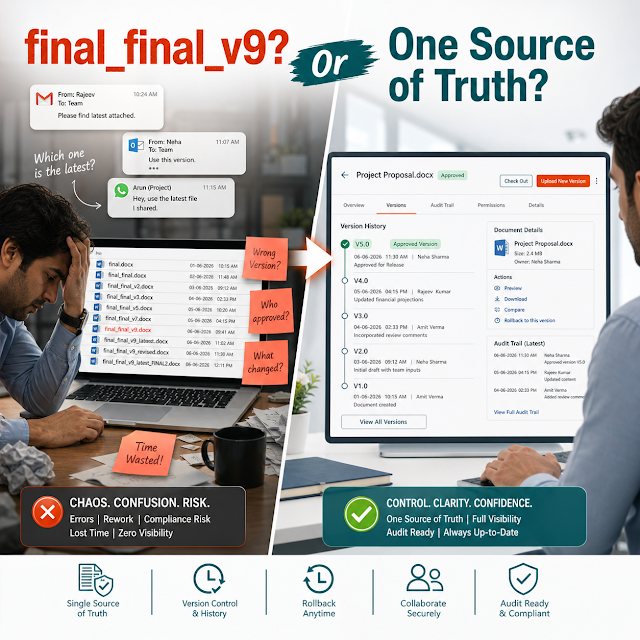
Improve approvals, visibility, and control with workflow automation built for document-heavy business processes.
ShareDocs Enterpriser document management system in India, enterprise DMS, workflow automation tools, compliance document management, document security and access control, audit trail, version control, SOP and policy management, records management, AI-enabled content operations, OCR and indexing, digital approvals, scalable enterprise workflows, secure collaboration, metadata and retention, compliance-ready controls.
Share Docs Enterpriser DMS and Workflow Automation Tools in India
If your teams spend more time searching, re-checking versions, chasing approvals, and preparing for audits than serving customers, the issue is rarely “people performance.” It’s usually the document workflow: files scattered across email threads, shared drives, WhatsApp, local folders, and disconnected applications—with unclear ownership, weak security, and slow, manual approvals.
In fast-growing Indian organizations—manufacturing, BFSI, pharma, education, logistics, construction, and professional services—documents are not just “files.” They are operational proof (policies, SOPs, invoices, contracts, HR records, vendor documents, QA reports) and decision triggers (approvals, exceptions, escalations, renewals). Without an enterprise-grade Document Management System (DMS) and workflow automation, document chaos becomes a measurable business risk.
This long-form guide explains what modern enterprise buyers in India should expect from ShareDocs Enterpriser-style DMS and workflow automation tools: stronger governance, faster cycle times, compliance readiness, better audit trails, and future-proofing for AI search and content operations.
What is an enterprise DMS?
An enterprise Document Management System is a secure, centralized platform to store, classify, find, control, and track business documents with permissions, versioning, audit logs, and retention—so teams can operate consistently at scale.
Why it matters
Most delays and compliance gaps happen between steps: creation → review → approval → distribution → acknowledgment → audit. DMS + workflow automation closes these gaps with control, evidence, and speed.
How it helps
It replaces “follow-up culture” with automated routing, reminders, escalations, and approvals—while ensuring only the latest, authorized document is used in operations.
Why this matters today (AI search, compliance, scale, buyer expectations)
The “document problem” has changed in 2025–2026. It’s not only about storage; it’s about trust, discoverability, and readiness—for auditors, customers, partners, and AI-powered search experiences.
1) Compliance is continuous
Audits are no longer “annual events.” Customers and regulators expect always-on evidence: access logs, change history, approvals, and document retention.
2) AI search demands structure
AI can only be reliable when content is well-indexed, permissioned, version-controlled, and context-rich. Unstructured drives produce untrustworthy answers.
3) Buyers expect speed
Enterprise buyers benchmark vendors on responsiveness: faster onboarding, quicker closures, shorter invoice cycles, and predictable SLAs enabled by automation.
Key challenges enterprises face (and why they persist)
Document sprawl & “version confusion”
Multiple copies in email, shared drives, and local devices lead to wrong approvals, rework, and operational mistakes. Without check-in/out and version control, teams cannot prove which document was valid at the time of action.
Manual approvals that don’t scale
Approvals stuck in inboxes cause delays in purchase requests, invoice processing, SOP changes, vendor onboarding, and customer documentation—especially when there’s no escalation or fallback approver.
Weak access control & data leakage risk
When “everyone has drive access,” sensitive contracts, HR files, pricing, and compliance documents are exposed. Enterprises need role-based access, least privilege, and activity tracking.
Audit stress & missing evidence
Auditors ask: “Who approved? When? Which version? What changed?” If evidence is scattered, teams spend days compiling proofs, risking non-conformance observations.
Low discoverability and slow retrieval
If content isn’t indexed by metadata, full-text OCR, and document type, retrieval becomes tribal knowledge. New hires and remote teams lose productivity immediately.
No retention discipline
Storing everything “forever” increases legal risk and storage costs. Deleting prematurely creates compliance risk. Retention rules and disposition workflows solve both.
Risks of doing nothing
- Revenue leakage: missed renewals, delayed billing, lost claims, and slower sales cycles due to document delays.
- Compliance exposure: inability to prove approvals, training acknowledgments, or controlled document distribution.
- Security incidents: sensitive documents forwarded externally with no traceability.
- Operational downtime: critical SOPs unavailable or outdated during audits, shift changes, or incidents.
- AI readiness gap: if content is messy, AI search and copilots return incorrect or unauthorized information—creating trust and privacy problems.
Deep-dive: how document chaos breaks real workflows
Document problems are easiest to see when you map a workflow end-to-end. Below are common enterprise processes where weak document management silently adds cost, risk, and cycle time.
Invoice processing & vendor payments
Invoices arrive via email/PDF. The AP team manually saves files, renames them inconsistently, asks for missing PO/GRN proofs, and follows up for approvals. Result: delayed payments, duplicate processing risk, and low vendor satisfaction. A DMS with workflow can enforce required attachments, route approvals by amount/cost center, and keep a complete audit trail.
SOP changes in manufacturing/QA
Quality teams update SOPs, circulate Word/PDF versions, and rely on email confirmations. Operators may still use older prints. During audit, proving who acknowledged which version becomes difficult. Controlled distribution, versioning, read-and-acknowledge, and training evidence are key requirements for compliance-ready operations.
Contract lifecycle & renewals
Contracts stored in shared folders without metadata create renewal surprises. Clauses and obligations aren’t searchable; approvals are unclear; legal versions get mixed. Structured indexing (party name, effective date, expiry, department) plus reminders and approval workflow reduces risk and improves negotiation readiness.
Solution approach: structured document management + workflow automation
A ShareDocs Enterpriser-style approach solves the root problem by turning documents into governed business objects. That means every document has: identity (metadata), ownership, permissions, version history, workflow state, and retention rules. Instead of “files floating around,” you get controlled content operations.
Definition: What is workflow automation in a DMS context?
Workflow automation in a document management system is the ability to route documents and tasks through predefined steps—submission, review, approval, publishing, notification, acknowledgment, and archival—using rules (role, department, amount, document type) with reminders and escalations. It reduces manual follow-ups and creates auditable proof of each action.
Feature breakdown (enterprise buyer checklist)
Central repository with smart indexing
Store documents in a single source of truth with folder taxonomy and metadata (department, location, document type, vendor/customer, project, dates). Add OCR/full-text indexing for scanned PDFs so users can find content by keywords, not filenames.
Role-based access & document security
Define least-privilege permissions by role, department, and document category. Track views/downloads/edits with audit logs. This supports confidentiality for HR, legal, finance, and compliance documents.
Version control & controlled publishing
Prevent “wrong version” usage by maintaining check-in/check-out, revision history, and controlled release. Publish only approved versions and restrict outdated copies, supporting SOP and policy governance.
Workflow automation: approvals, routing, escalations
Configure workflows by document type. Route to reviewers/approvers, enforce SLA timelines, send reminders, and escalate when overdue. This is essential for CAPA documents, purchase approvals, onboarding, and change requests.
Audit trail & compliance reporting
Capture immutable evidence: who uploaded, who approved, who accessed, what changed, and when. Generate reports for audits and management reviews without last-minute firefighting.
Retention & records lifecycle management
Apply retention schedules by category (contracts, invoices, HR records, QA documents). Support disposition approvals and legal hold-style controls when needed, reducing risk and keeping storage purposeful.
Comparison: basic file storage vs enterprise DMS + workflow
Basic shared drives / email-based process
Search: relies on filenames and memory
Approvals: manual follow-ups, unclear status
Security: broad access, weak traceability
Audit: evidence compiled manually
Versions: duplicates and confusion
Scale: breaks with new locations/teams
ShareDocs Enterpriser-style DMS + workflow
Search: metadata + OCR + filters for fast retrieval
Approvals: automated routing, reminders, escalations
Security: role-based access + audit trail
Audit: instant evidence with reports and logs
Versions: controlled publishing and revision history
Scale: standardized governance across units
Industry use cases (realistic scenarios in India)
Manufacturing & Engineering
A multi-plant manufacturer needs controlled SOPs, QA checklists, calibration certificates, vendor compliance documents, and CAPA records. A DMS ensures each plant uses the same approved version, captures acknowledgments, and provides audit-ready traceability.
BFSI / NBFC / Insurance
Customer onboarding includes KYC documents, sanction checks, internal approvals, and policy disclosures. Workflow automation helps maintain step-by-step evidence, reduces turnaround time, and supports compliance document management with strict access controls.
Pharma & Healthcare
Batch records, controlled documents, deviations, and training documents must be managed with robust audit trails. A structured DMS supports consistent documentation, version control, and rapid retrieval during inspections.
Education & Large Institutions
Central admin teams manage contracts, approvals, student records, accreditation documents, and procurement. A DMS reduces dependency on individuals, improves retrieval, and standardizes approvals across campuses.
Construction & Projects
Drawings, BOQs, RA bills, site instructions, and compliance certificates change frequently. A controlled document workflow helps ensure field teams access the latest drawings and approvals are recorded to prevent disputes.
Professional Services
Proposals, SOWs, client deliverables, and compliance evidence need secure collaboration. A DMS improves reuse of templates, prevents accidental sharing, and keeps client work auditable.
Implementation perspective (what successful rollouts do differently)
The best implementations focus on outcomes, not just deployment. A practical approach is to start with 1–2 high-impact workflows (for example, SOP control and invoice approvals), prove adoption, and then expand across departments.
Step 1: Document inventory & taxonomy
Identify document types, owners, required metadata, and retention needs. Define consistent naming and indexing rules so search works for everyone.
Step 2: Workflow mapping
Convert informal approvals into clear stages with SLAs: submit → review → approve → publish → notify → acknowledge → archive.
Step 3: Security & governance
Define roles, access boundaries, and audit requirements. Ensure sensitive functions (HR/legal/finance) have stronger controls.
Adoption improves when the system is aligned with daily routines: fewer clicks to upload, quick search, templates, and dashboards that show “what’s pending with me.”
Business impact & ROI (how to justify the investment)
A DMS and workflow automation platform often pays for itself through measurable efficiency and risk reduction. You can quantify ROI using cycle time, audit effort, and error rates—not just “paper savings.”
Cycle time reduction
Automated routing and reminders reduce approval delays. Even a 20–30% faster invoice or purchase approval cycle improves cash flow, vendor relationships, and internal SLA performance.
Lower audit preparation effort
With audit trails, version history, and reports, teams spend less time collecting evidence. This also reduces “audit anxiety” and improves day-to-day compliance discipline.
Fewer errors & rework
Controlled versions and mandatory fields reduce mistakes like wrong templates, missing attachments, and outdated SOP usage. Rework reduction translates directly into cost savings.
Future-readiness: AI-enabled content operations (without losing control)
Organizations want AI to answer questions like “Which SOP is applicable for this line?” or “Show contracts expiring next quarter.” But AI is only safe when document governance is strong.
Why governance is the foundation for AI search
AI search performs best when documents are cleanly indexed (metadata + OCR), permissioned (users only see what they’re allowed to), and version-controlled (the system knows which content is authoritative). A structured DMS supports “trusted answers” instead of guesswork.
For enterprise buyers, the real win is not “AI for everything.” The win is AI-ready operations: consistent document classification, reliable retrieval, and confidence that content is current, approved, and traceable.
FAQ
1) Which departments benefit most from an enterprise DMS?
Finance (invoices and approvals), HR (employee records), QA/Compliance (SOPs and audits), Legal (contracts), and Procurement (vendor documents) typically see immediate value because their work depends on controlled documents and traceable approvals.
2) What is the difference between document management and records management?
Document management focuses on active creation, collaboration, approvals, and versioning. Records management focuses on retention, disposition, and compliance controls for documents that must be preserved as official evidence.
3) How does workflow automation improve approvals?
It assigns the right approver automatically based on rules, shows real-time status, sends reminders, and escalates overdue tasks. This replaces manual follow-up and creates audit-ready proof of each step.
4) Can a DMS help with compliance audits like ISO-related documentation?
Yes. Controlled documents, version history, approval logs, distribution records, and acknowledgments make it easier to demonstrate process adherence and change control during audits.
5) What should I evaluate when selecting a DMS and workflow tool in India?
Evaluate security and access controls, audit trails, metadata and search, workflow configurability, retention support, scalability across locations, usability for business teams, and vendor support for implementation and change management.
Ready to streamline documents and approvals across your enterprise?
If you want faster retrieval, stronger security, cleaner audits, and predictable approvals, explore ShareDocs resources and product information. Start with a high-impact workflow and scale from there.