Enterprise Content Management Solutions for Businesses Sharedocs explained for modern businesses with practical use cases, risks, and ways to impro...
ShareDocs enterprise content management solutions for businesses focus on enterprise document management, secure document storage, document security, workflow automation, compliance document management, audit trails, records retention, version control, approvals, role-based access, metadata, document indexing, AI-enabled content operations, and scalable content governance.
Enterprise Content Management Solutions for Businesses Sharedocs
Most businesses don’t lose deals because they lack documents—they lose deals because they can’t find the right version, can’t prove compliance, or can’t move work forward when approvals, audits, renewals, or customer requests arrive. As content grows across email threads, file shares, local drives, and chat tools, the cost of “messy content” becomes measurable: longer cycle times, higher risk exposure, and teams that spend more time searching than executing.
This guide explains what enterprise content management (ECM) and enterprise document management look like in practice, why it matters right now, and how a ShareDocs-style structured document management approach can help businesses improve security, compliance readiness, and operational speed—without turning documentation into a bottleneck.
What is Enterprise Content Management (ECM)?
Enterprise Content Management is a set of processes and tools used to capture, organize, secure, govern, and deliver business content (documents, records, forms, and related data) across departments—so the right people can access the right information at the right time, with proof of control.
Why this matters today (AI search, compliance, scale, buyer expectations)
ECM used to be “nice to have.” Now it is infrastructure. Four forces are raising the bar for content operations:
1) AI search is changing how people expect to find answers
Teams no longer accept “check three folders and ask someone.” They expect search to return the correct document, policy, or clause quickly—ideally with context. That requires structured, well-governed content with consistent metadata, versioning, and permissions.
2) Compliance and audit demands are increasing
Regulations, customer security questionnaires, and partner audits demand evidence: who approved what, when it changed, and who had access. Without audit trails and retention controls, organizations default to manual “document chasing” during audits.
3) Scale multiplies content risk
As you add locations, products, and vendors, the number of documents expands faster than headcount. Inconsistent naming, uncontrolled sharing, and duplicated files create operational drag and increase the chance of using outdated information.
4) Buyer expectations include proof of governance
Enterprise buyers increasingly evaluate vendors on documentation quality and control: security policies, SOC/ISO evidence, contract templates, and change logs. Strong content governance accelerates procurement and renewals.
Why it matters:
When content is governed and searchable, decisions move faster, audits become predictable, and teams spend less time on rework. When content is unmanaged, every approval, renewal, claim, incident, or customer request costs more than it should.
Key challenges businesses face (and why they persist)
Document sprawl and poor findability
Files live across shared drives, inboxes, WhatsApp, local desktops, and multiple cloud folders. Search becomes unreliable because filenames and storage patterns are inconsistent.
Version confusion and rework
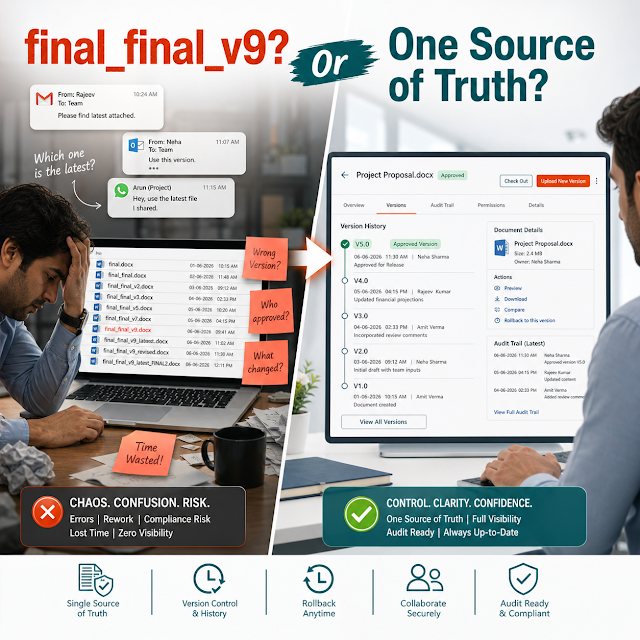
Teams unknowingly edit old templates or attach outdated policies. The result is rework, conflicting records, and avoidable risk—especially in contracts, QA, and regulated processes.
Access control that’s too broad (or too slow)
“Everyone has access” is risky; “ask IT for access” is slow. Businesses need role-based permissions aligned to teams, projects, and confidentiality levels.
Manual approvals and unclear accountability
Policies, SOPs, invoices, and contracts often circulate by email with “final_final” filenames. Without workflows and audit trails, ownership and approval proof are weak.
Compliance document management gaps
Retention schedules, disposition, and policy-controlled access are hard to enforce when content isn’t centralized and tagged properly.
Inconsistent metadata and taxonomy
Without a shared structure (document types, departments, clients, projects), reporting is limited and automation becomes difficult.
Risks of doing nothing
- Audit pain: scrambling to collect evidence, approvals, and historical versions.
- Security exposure: sensitive documents shared too widely, or retained too long.
- Operational drag: teams waste hours searching, recreating, and reconciling files.
- Revenue impact: slower proposals and contract cycles; delayed onboarding and renewals.
- Decision risk: leadership decisions made using incomplete or outdated information.
Deep-dive: how unmanaged content breaks real workflows
The real damage from poor content management shows up inside everyday workflows. Here are common scenarios that illustrate how issues compound across departments:
Sales and proposals
A salesperson pulls an old capability deck, uses outdated pricing language, and sends it to a regulated buyer. Legal and compliance then rush to correct it, creating delay and reducing buyer confidence. With structured content, teams publish approved templates, lock key sections, and track usage so the “latest approved” version is always easy to find.
Finance and vendor documentation
Invoices and PO attachments arrive via email and get saved inconsistently. At month-end, finance teams spend days tracing approvals and checking duplicates. A document management system streamlines this by indexing documents, capturing metadata, enforcing naming rules, and keeping an audit trail of approvals.
HR policies and employee records
Different departments distribute different policy PDFs. Employees follow the wrong procedure, then HR must resolve disputes without a clear record of the “policy in force.” With governance controls, HR can publish controlled versions, set review dates, and restrict access to confidential employee documents.
Quality, SOPs, and controlled documents
Manufacturing or service teams may keep SOPs in shared folders with no check-in/check-out discipline. When an incident occurs, it’s hard to prove what procedure was active at the time. A controlled document workflow provides version history, formal approvals, and read-and-acknowledge tracking (where applicable).
Customer support and knowledge handoffs
Support teams rely on tribal knowledge and old attachments. Cases take longer and escalations increase. Structured repositories with clear taxonomy (product, version, issue type) reduce resolution time and ensure customers receive accurate, consistent information.
Solution approach: structured document management that scales
A modern enterprise content management solution isn’t just a “place to store files.” It’s a system that combines structure (metadata + taxonomy), control (permissions + versioning + audit), and flow (workflows + approvals) so content becomes dependable.
How structured document management helps:
It turns documents into governed assets—organized by type and context, protected by role-based access, traceable through audit logs, and moveable through consistent workflows—so teams can execute faster and prove compliance when asked.
A ShareDocs-style approach typically focuses on four practical principles:
Centralize without creating bottlenecks
Store documents in a controlled repository with clear ownership, while enabling self-service access based on roles so work doesn’t depend on one gatekeeper.
Standardize document types and metadata
Define document categories (contracts, SOPs, invoices, employee letters) and required metadata (department, client, project, effective date). This drives better search, reporting, and automation.
Automate repeatable workflows
Implement approvals, reviews, escalations, and notifications for common processes. Workflows reduce cycle time and ensure the organization can prove who approved what.
Secure by design
Apply role-based access, confidentiality controls, and audit logs by default, not as an afterthought—especially for HR, legal, finance, and customer data.
Feature breakdown (what to look for in an ECM/DMS)
Below are the capabilities that most businesses prioritize when selecting an enterprise document management solution. The goal is not more features—it’s fewer exceptions in daily work.
Central repository + secure access
A single source of truth with role-based access control (RBAC). This reduces oversharing and ensures confidential documents are protected while still accessible to authorized teams.
Version control + document history
Track changes across versions, restore prior versions when needed, and clearly identify the current approved copy. This is essential for SOPs, policy documents, and contract templates.
Audit trails for accountability
Capture who viewed, downloaded, edited, approved, and shared documents. Audit logs simplify investigations, internal controls, and external audits.
Workflow automation
Route documents for review and approval with SLAs, reminders, and escalation paths. This helps remove email-based approvals and ensures consistent governance.
Metadata, taxonomy, and fast search
Structured tags (department, client, process, effective date) make search accurate and support reporting. Better findability directly reduces time spent searching and re-creating documents.
Retention and compliance controls
Define retention periods, review cycles, and archival rules to support compliance document management. This is particularly valuable for regulated industries and contractual recordkeeping.
Comparison: unmanaged storage vs. enterprise content management
Many organizations start with shared drives or generic cloud folders. That can work at small scale, but it breaks under governance and audit pressure. Here’s a practical comparison:
Unmanaged storage (folders + email)
- Search depends on filenames and memory
- Access is often too broad or inconsistent
- Approvals happen via email with weak traceability
- Version sprawl (“final_v7”)
- Audit response becomes a manual project
Enterprise content management (ShareDocs-style DMS)
- Search works through metadata + indexing
- Role-based access and controlled sharing
- Workflow automation with approvals and logs
- Single source of truth with version history
- Audit trails and retention support compliance
Industry use cases (realistic business scenarios)
ECM value becomes clear when mapped to outcomes by industry. These scenarios represent common patterns businesses can implement quickly.
Manufacturing / Engineering
Scenario: Controlled SOPs, work instructions, and quality records distributed across shifts and sites.
ECM outcome: Version-controlled SOP library, approval workflows for changes, and audit-ready history for inspections and incident reviews.
Healthcare / Clinics
Scenario: Policy updates, vendor contracts, and administrative records must be secure and quickly retrievable.
ECM outcome: Restricted access for sensitive documents, clear retention, and rapid retrieval during audits or compliance checks.
Financial Services / NBFC
Scenario: Customer onboarding documentation and internal approvals are time-sensitive and regulated.
ECM outcome: Automated review steps, strict access controls, and traceable approval histories to support internal audits.
IT / SaaS / Services
Scenario: Security policies, DPAs, and customer documentation required for procurement and renewals.
ECM outcome: Approved templates, rapid retrieval for security questionnaires, and consistent “single source” evidence packages.
Construction / Real Estate
Scenario: Project documents, permits, and vendor files must be organized by site and phase.
ECM outcome: Site-based folder standards plus metadata for project stage, vendor, and validity—reducing delays when teams change or projects overlap.
Education / Training Organizations
Scenario: Policies, curriculum documents, and accreditation evidence spread across departments.
ECM outcome: Structured repositories for accreditation artifacts, review cycles, and audit-ready change history for governance teams.
Implementation perspective: how to roll out ECM without disrupting work
Successful ECM implementations avoid “big bang” migrations and focus on the workflows where content risk and time loss are highest. A pragmatic rollout typically follows these steps:
Step 1: Identify high-impact document journeys
Start with processes where the cost of errors is high (contracts, SOPs, HR policies, finance approvals) or where teams repeatedly search and recreate documents.
Step 2: Define a simple taxonomy and required metadata
Keep metadata minimal but meaningful: document type, department, owner, effective date, client/project (if relevant), and confidentiality classification.
Step 3: Configure roles, permissions, and approval workflows
Align roles to real operating models: authors, reviewers, approvers, and readers. Add audit logging and versioning as non-negotiables for controlled documents.
Step 4: Migrate in phases and de-duplicate
Migrate current, high-value content first. Archive or label legacy files. Introduce naming standards to reduce future sprawl.
Step 5: Train teams on “how work moves” (not just features)
Adoption improves when training maps to job tasks: “submit SOP for approval,” “find the latest contract template,” “respond to an audit request,” and “restrict confidential HR documents.”
Business impact and ROI (what leaders can measure)
ROI from enterprise content management is typically a mix of hard savings, risk reduction, and revenue acceleration. The most useful measurement approach ties outcomes to the document lifecycle:
Time saved (search + rework)
Measure baseline time spent searching for documents and re-creating lost files. Improved search and a single source of truth can materially reduce weekly overhead across teams.
Faster cycle times (approvals + onboarding)
Track approval SLA improvements for contracts, policies, SOP changes, and vendor onboarding. Workflow automation reduces bottlenecks and eliminates email back-and-forth.
Reduced compliance cost
Quantify audit prep time and the number of compliance exceptions. Strong audit trails, versioning, and retention controls lower the cost of audits and investigations.
Lower security exposure
Monitor reductions in overshared files, unauthorized access incidents, and risky external sharing. Document security improves when permissions are role-based and consistently enforced.
Revenue acceleration
Track faster RFP/proposal turnaround, reduced legal review delays, and quicker renewals due to better retrieval of evidence and approved templates.
Future-readiness: AI-enabled content operations start with governance
Many businesses want AI to summarize policies, answer employee questions, or accelerate customer responses. But AI is only as reliable as the content foundation beneath it. If documents are duplicated, outdated, and inconsistently labeled, AI will produce inconsistent answers.
A well-implemented ECM/DMS prepares you for AI search and AI-enabled content operations by:
- Improving data quality: structured metadata, consistent document types, and controlled versions.
- Reducing hallucination risk: clear “current approved” artifacts and restricted access to drafts.
- Enabling scoped retrieval: AI can search within authorized repositories and return answers grounded in approved documents.
- Supporting explainability: audit trails and version history help explain why a policy says what it says and when it changed.
In other words, ECM is not separate from AI strategy—it is the operational prerequisite for responsible AI adoption in knowledge-heavy businesses.
FAQ
1) What is the difference between ECM and a document management system (DMS)?
A DMS typically focuses on storing, organizing, securing, and controlling documents (versions, access, workflows). ECM is broader: it includes DMS plus content governance, records management, and end-to-end content operations across the enterprise.
2) How does enterprise document management improve compliance?
It improves compliance by enforcing access controls, tracking document history, maintaining audit trails, and supporting retention rules. This makes it easier to prove control during audits and reduces policy and process inconsistencies.
3) What features matter most for document security?
Role-based access (RBAC), secure sharing controls, audit logs, version control, and clear ownership are the most important. These features prevent oversharing and make sensitive document activity traceable.
4) Can workflow automation reduce approval delays?
Yes. Automated workflows assign reviewers and approvers, send reminders, apply escalation rules, and create an approval record. This reduces email back-and-forth and makes cycle times predictable for contracts, SOPs, finance approvals, and policy updates.
5) How do I start implementing ECM without migrating everything at once?
Start with one or two high-impact document workflows (for example: contract templates and approvals, HR policies, or SOP control). Define a simple taxonomy, set permissions, enable versioning and audit trails, and migrate only current, active documents first.
Ready to bring control, speed, and audit-readiness to your business documents?
If your teams are dealing with scattered files, approval delays, compliance pressure, or version confusion, a ShareDocs-style enterprise content management approach can centralize documents, secure access, automate workflows, and prepare your organization for AI-ready content operations.
Tip: For faster evaluation, list your top 3 document workflows (e.g., contract approvals, SOP management, invoice processing) and the risks you’re trying to eliminate (e.g., audit gaps, oversharing, outdated templates).