
How to Introduce Mobile DMS to your Coworkers Sharedocs
If your team is still passing documents through email threads, shared drives, and chat attachments, you already know the pain: lost versions, slow approvals, “Who edited this?” confusion, and security risk that grows every time someone downloads a file to a personal phone. Introducing a Mobile Document Management System (Mobile DMS) can fix this—but only if it’s introduced in a way that respects how coworkers actually work.
This guide is a practical, buyer-focused playbook to help you roll out Mobile DMS adoption inside your organization. It covers the real objections people have, how to position the value, what workflows to pilot first, and how a ShareDocs-style structured document management approach reduces risk while making daily work faster.
Definition Block: What is a Mobile DMS?
Mobile DMS is a document management system designed to let authorized users securely find, view, share, approve, and control documents from mobile devices, while keeping governance features like access control, version history, audit trails, and retention policies intact.
Why this matters today (AI search, compliance, scale, buyer expectations)
Mobile access is no longer “nice to have.” Teams are distributed, vendors and customers expect rapid turnaround, and auditors assume you can prove document control. Meanwhile, AI search is changing how people find information: they expect to ask a question and get a trusted answer—fast. If your documents live in uncontrolled folders, the best AI in the world will still produce unreliable results because the underlying content is inconsistent, duplicated, and poorly labeled.
Introducing Mobile DMS is increasingly tied to:
Definition Block: Why Mobile DMS matters
Mobile DMS matters because it reduces document risk while improving speed. It lets teams work from anywhere without sacrificing governance—so decisions happen faster, and the organization can still meet compliance, security, and records requirements.
Key challenges you’ll face (and why they’re normal)
Adoption isn’t just training. It’s addressing habits, incentives, and fear of change. Below are the most common barriers when introducing a Mobile DMS to coworkers.
Risks of doing nothing
- Document leaks and uncontrolled sharing: Attachments and forwarded links spread outside intended audiences.
- Compliance exposure: Inability to demonstrate version control, approvals, or retention can fail audits.
- Operational drag: Time is lost searching, re-requesting files, and reconciling conflicting versions.
- Decision delays: Executives and managers can’t approve from the field, causing bottlenecks.
- AI search failure: If content is messy, AI surfaces outdated or incorrect information—creating business risk, not savings.
Deep-dive: How these problems show up in real workflows
Mobile DMS adoption succeeds when coworkers can connect the tool to the friction they experience every week. Here are common workflows where document chaos becomes expensive.
1) Field approvals (projects, maintenance, site visits)
Without Mobile DMS, field teams take photos, write notes, and send them via chat/email. Office teams later retype information and attach “final” documents that may not match what happened onsite. A Mobile DMS workflow enables controlled capture, linking evidence to the correct document record, and routing approvals with a clear status.
2) Policy and procedure updates
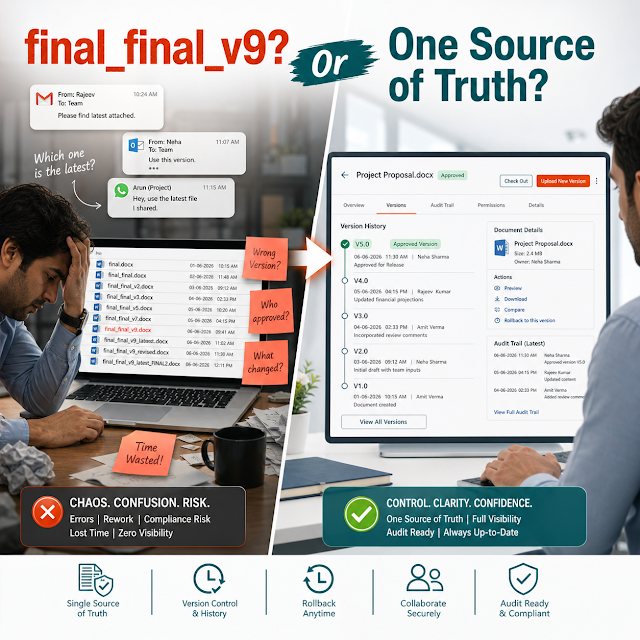
Policies often live in folders with names like “FINAL_FINAL_2025.” People keep local copies, so outdated policies keep circulating. A structured DMS enforces a single source of truth, makes the current version obvious, logs changes, and captures approvals—important for compliance document management.
3) Sales, proposals, and contracts
Sales teams want fast turnaround and mobile access, but legal and finance need control. Mobile DMS helps reconcile both by restricting who can edit, controlling external sharing, and creating a traceable approval path before anything is sent to a customer.
4) Invoice and vendor documentation
When invoices, delivery notes, and vendor certificates are scattered, disputes take longer and teams can’t prove what was approved. A DMS with workflow automation links documents to the transaction context and reduces “missing paperwork” delays.
5) HR onboarding and employee documents
HR documents are sensitive and must be access-controlled. Mobile DMS reduces risky email sharing, supports role-based access, and helps ensure the right forms are captured and retained correctly.
Solution approach: Introduce Mobile DMS with a structured ShareDocs-style model
The easiest way to introduce Mobile DMS is to avoid trying to “replace everything” in week one. Instead, connect the rollout to two measurable outcomes: faster cycle time and lower document risk. A ShareDocs-style structured document management approach makes this practical by standardizing how documents are captured, classified, routed, and governed.
Definition Block: How structured document management helps
Structured document management means documents are stored with consistent metadata, controlled access, clear ownership, and repeatable workflows. This helps by making documents findable, secure, auditable, and usable for automation and AI search.
A practical internal rollout sequence:
- Pick one workflow with visible pain: approvals, policy updates, or field reporting—something coworkers want fixed.
- Define “done” in business terms: e.g., “proposal approvals drop from 3 days to 1 day” or “only one controlled version exists.”
- Create a simple document structure: categories, naming rules, minimum metadata, ownership, and access roles.
- Make mobile the convenience layer: approvals, viewing, quick capture—avoid complex editing tasks on day one.
- Run a pilot with champions: select respected users from operations + compliance + IT as a shared steering group.
- Publish “source of truth” guidance: where final docs live, when email attachments are not allowed, and what to do with legacy folders.
- Measure and communicate wins: time saved, fewer reworks, fewer “missing doc” incidents, improved audit readiness.
Mobile DMS feature breakdown (what coworkers actually care about)
When you present Mobile DMS to coworkers, translate features into job outcomes. These cards give you messaging that ties enterprise document management capabilities to daily work.
Comparison: Email + shared drives vs. Mobile DMS (no tables)
If you need a simple way to explain the difference to coworkers and leadership, use the side-by-side cards below.
Traditional approach: Email + shared folders
- Multiple “final” versions across devices
- Hard to prove approvals and accountability
- Search depends on filenames and tribal knowledge
- Access control is inconsistent and easily bypassed
- Mobile work means downloading and resending files
Structured approach: Mobile DMS
- One controlled source of truth with version history
- Workflow automation for review/approve with status
- Findability using metadata and consistent structure
- Stronger document security and permissioning
- Mobile access supports fast decisions without risk
Industry use cases (realistic scenarios)
Mobile DMS benefits look different depending on what documents you manage and how regulated your environment is. These scenarios can help you choose your first pilot workflow.
Construction & Engineering
Site supervisors need the latest drawings, method statements, and inspection checklists. Mobile DMS prevents teams from using outdated PDFs and supports controlled sign-offs for inspections and handovers.
Healthcare & Clinics
Policies, vendor certificates, and internal SOPs must stay current. Mobile access helps managers confirm the latest procedure quickly, while permissioning supports confidentiality and controlled updates.
Manufacturing & Quality
Quality records, work instructions, and CAPA documents require traceability. A mobile DMS supports shop-floor access to current documents and keeps approval history for audits.
Legal, Finance & Corporate Admin
Contracts and board documents are sensitive and time-critical. Mobile DMS enables controlled distribution, approvals, and a single authoritative version without relying on email attachments.
Education & Training Organizations
Training materials, policies, and student-related administrative documents often sprawl across drives. A structured DMS improves discoverability and ensures the latest approved material is in use.
Implementation perspective (how to make coworkers say “yes”)
Introducing Mobile DMS is as much change management as it is technology. These steps keep the rollout grounded and reduce adoption friction.
Start with a “why” coworkers accept
Lead with the pain they feel: rework, missing files, approvals that stall, and unclear responsibility—not a generic “digital transformation” message.
Make the mobile experience a shortcut
Optimize first for viewing, approving, and searching—actions that truly benefit from mobile. Keep complex editing as a later phase if needed.
Create lightweight governance
Define owners, document types, minimum metadata, and permission roles. Governance should enable speed while protecting the organization.
Train with “day-in-the-life” tasks
Training works best when it mirrors real workflows: “approve a policy,” “find the latest checklist,” “share a controlled link,” “check status.”
Set clear boundaries for old habits
Publish what changes: when attachments are not allowed, how to request access, and how to handle documents that must be retained.
Measure outcomes, not activity
Track cycle time, rework incidents, audit findings, and search time reduction. Adoption follows visible improvement.
Business impact / ROI (what leadership wants to see)
For leaders, Mobile DMS is not an app—it’s an operational control layer. ROI typically shows up in three categories: time savings, risk reduction, and improved throughput.
Practical ROI tip: before rollout, capture a baseline for approval cycle time and time-to-find a document. After rollout, measure again with the pilot group. These two metrics are easy to explain and strongly correlated with productivity.
Future-readiness: the AI angle (make your content usable, not just stored)
As AI search becomes common in the enterprise, the organizations that benefit most won’t be the ones with the most documents—they’ll be the ones with the best-controlled, best-labeled, most trustworthy documents. Mobile DMS supports AI readiness by improving the content foundation: consistent metadata, fewer duplicates, clear version status, and permission-aware access.
Trust signals for AI answers
When documents have a clear owner, approval state, and version history, AI-assisted experiences can prioritize the right content and reduce outdated recommendations.
Permission-aware knowledge access
Enterprise AI must respect access controls. A DMS designed for document security provides the governance layer that keeps AI retrieval aligned with roles.
Automation becomes safer
Workflow automation is safer when documents are structured. You can trigger actions based on status, type, or metadata instead of unreliable folder names.
FAQ (real search-style questions)
How do I convince coworkers to stop emailing document attachments?
Replace attachments with a rule and an easier alternative: share controlled links from the DMS, make the “current version” obvious, and focus on one workflow first (like approvals) where the DMS is clearly faster than email.
Is Mobile DMS secure on personal phones (BYOD)?
It can be, if you configure access controls correctly and standardize how documents are accessed (viewing via the DMS rather than downloading files). Define what’s allowed on BYOD, what data is stored locally, and how access is revoked when someone leaves.
What documents should we move into a DMS first?
Start with documents that cause delays or risk: policies/SOPs, contracts, quality records, vendor certificates, or project approvals. Choose one category where “wrong version” has a real cost and success is easy to measure.
How does Mobile DMS help with compliance and audits?
It supports compliance document management by keeping controlled versions, tracking approvals, logging access activity, and making it easier to demonstrate that the organization follows documented processes.
Will a DMS improve AI search results for internal knowledge?
Yes—if your DMS enforces structure. AI search depends on trustworthy, current content and clear metadata. A structured DMS reduces duplicates, improves version clarity, and keeps permissions consistent so AI retrieval is safer and more accurate.
Next steps (internal links)
If you’re planning a Mobile DMS rollout, keep the focus on outcomes: speed, control, and confidence in the “right document.” For more ShareDocs updates and guidance, browse:
Ready to introduce Mobile DMS the right way?
Use a structured rollout that improves workflow automation, strengthens document security, and supports compliance document management—without overwhelming your team.
Tip for internal champions: share this article with your pilot group and ask each person to identify one workflow where mobile approvals or controlled sharing would save them time this week.