
Best HIPAA Compliant Workflow Automation by Sharedocs Enterpriser
In healthcare and other regulated industries, document workflows are rarely “just paperwork.” They are the operational backbone for patient intake, referrals, authorizations, billing, HR onboarding, vendor management, quality programs, incident reporting, and policy distribution. When these workflows live in email threads, shared drives, and spreadsheets, organizations pay the price in delays, rework, and compliance risk—especially when Protected Health Information (PHI) is involved.
HIPAA-compliant workflow automation solves a specific business problem: move documents through review, approval, and controlled access without losing traceability, security, or governance. This article breaks down the practical requirements buyers should evaluate and how a ShareDocs-style enterprise document management approach can help standardize secure workflows at scale.
Why this matters today: AI search, compliance pressure, and scale
Buyer expectations have changed. Teams want faster turnaround, fewer handoffs, and immediate answers to “Where is the latest version?” or “Who approved this?” At the same time, regulators and auditors expect repeatable controls: access restrictions, audit trails, retention rules, and demonstrable policy enforcement.
Another shift is underway: AI search and AI-enabled content operations. Organizations increasingly rely on systems that can quickly surface the right documents, map related content, and reduce manual triage—without exposing sensitive data. In regulated environments, AI value depends on strong foundations: structured repositories, consistent metadata, and permissioned access. Without those, “AI search” becomes an operational and compliance liability.
What is HIPAA-compliant workflow automation?
HIPAA-compliant workflow automation is the use of controlled, permission-based process steps (routing, approvals, notifications, and records) to handle documents that may contain PHI—while maintaining safeguards like access control, audit logging, secure storage, and policy-driven retention.
Why it matters
It reduces human error, shortens cycle times for approvals and authorizations, and creates an audit-ready record of “who did what, when, and why”—which is crucial for compliance document management.
How it helps
It standardizes document handling across departments, enforces consistent security controls, and makes information easier to find through structured metadata—unlocking safe, scalable AI-assisted search and reporting.
Key challenges buyers face (and what to look for)
Risks of doing nothing
- Higher breach exposure: PHI leaks often come from misrouted emails, excessive access, or unmanaged downloads.
- Audit friction: time-consuming evidence collection, missing approvals, and unclear distribution history.
- Process delays: slow authorizations and document handoffs that directly affect patient experience and revenue cycle performance.
- Operational cost: staff spend hours searching, re-requesting files, and reconciling versions.
- Inconsistent policy enforcement: retention, access controls, and SOP adherence vary by team and location.
Deep-dive: how these issues break real-world workflows
The biggest workflow failures happen at the boundaries—when a document leaves a controlled system and enters a loosely governed channel like email or consumer file sharing. Below are common HIPAA-adjacent workflows and the exact points where risk and delays accumulate.
A packet may include clinical notes, lab results, and provider documentation. When assembled manually, teams copy/paste from multiple sources, attach files in email, and rely on “reply all” for status.
Compliance teams revise policies, circulate Word/PDF versions, and collect approvals through email. Staff may keep local copies that remain in use long after updates.
Forms arrive via scan, email, portal download, or in-person paperwork. Staff rename files inconsistently, making retrieval difficult later—especially during disputes or audits.
When incidents occur, teams must gather statements, evidence, and corrective actions—often under time pressure. If stored loosely, information is hard to secure and harder to track.
The common theme: workflows require both speed and proof. Speed without proof creates compliance risk. Proof without speed creates bottlenecks. HIPAA-compliant workflow automation aims to deliver both.
Solution approach: structured document management + controlled automation
A reliable approach starts with enterprise document management principles: centralize content, apply consistent metadata, enforce permissions, and capture every action in an audit trail. Workflow automation then orchestrates how documents move—who reviews, who approves, what happens if someone delays, and how the final version is published and retained.
In practical terms, ShareDocs-style structured document management helps organizations:
- Build a single source of truth for policies, patient-related documentation, and operational records.
- Standardize naming, indexing, and retrieval through metadata and templates.
- Control access using least-privilege permissions and role-based security.
- Automate routing and approvals with time-bound steps and escalations.
- Prove compliance with searchable logs, reports, and version history.
If you’re evaluating platforms, prioritize systems that support both document security and workflow automation without forcing users to work outside the governed environment.
Feature breakdown: what “good” looks like in HIPAA-compliant workflow automation
Define who can view, edit, approve, download, or share. Ensure minimum necessary access to PHI and sensitive operational documents.
Capture views, changes, approvals, and shares. Reporting should be easy to filter by document, user, date, department, or workflow step.
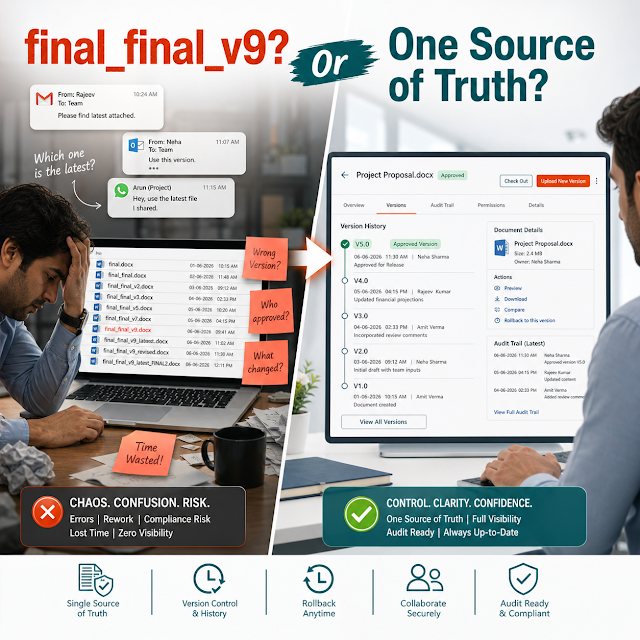
Prevent “final_v7_reallyfinal” chaos. Ensure only approved versions can be published, distributed, or used as templates.
Define steps (review → compliance → legal → approval), deadline reminders, and escalation paths—so work doesn’t stall in inboxes.
Use consistent fields (patient ID, document type, facility, effective date, expiration) to reduce retrieval time and support AI search safely.
Apply record retention by category, lock records when needed, and prove disposal happened according to policy—not ad hoc deletions.
Comparison: ad-hoc tools vs. governed enterprise workflows
Ad-hoc email + shared drives
- Approvals are implicit and hard to prove
- Permissions are broad and difficult to audit
- Versioning depends on user discipline
- Retention is inconsistent or manual
- Search is slow and error-prone
ShareDocs-style DMS + workflow automation
- Approvals are explicit, tracked, and reportable
- Granular access controls support minimum necessary
- Version control ensures one source of truth
- Retention rules apply automatically by record type
- Structured metadata improves retrieval and analytics
Industry use cases: realistic scenarios buyers recognize
Hospitals & clinics: referral and intake document control
A multi-site clinic receives referrals with attachments from multiple partners. Staff must route to the correct team, ensure required documents are present, and restrict access based on role.
With governed workflow automation: intake packets are indexed by patient and referral type, routed to the right queue, and logged. Missing items trigger an automated request, and the final packet is retained based on policy.
Payers / TPAs: prior authorization and appeals
Teams review medical necessity documentation, track deadlines, and communicate outcomes. Mistakes impact patient care and create regulatory exposure.
With structured workflows: documents are assembled from controlled sources, reviewers follow defined steps, and decision records are traceable with timestamps and approver identity.
Diagnostics & labs: results distribution and retention
Labs must retain results and control who can access them. Operationally, teams need fast retrieval for reprints, reorders, and disputes.
With enterprise document management: results are categorized, protected by RBAC, and retrievable via indexed fields, with automated retention and audit visibility.
Healthcare vendors: HR, training, and policy acknowledgment
Vendors supporting healthcare still handle regulated processes: onboarding, role-based training records, and policy acknowledgments.
With automated workflows: policy revisions are reviewed and approved, published to the right audience, and acknowledgment status is reportable for audits.
Implementation perspective: how to roll this out without disruption
Successful implementations treat workflow automation as an operational design project, not just a software install. A practical rollout plan prioritizes the highest-risk, highest-volume workflows first.
Operational tip: start with a single workflow like policy updates or prior authorization packets. Prove value quickly, then reuse templates across departments to scale.
Business impact and ROI: what changes after automation
Efficiency gains you can measure
- Reduced time spent searching for documents via indexed fields and controlled repositories
- Shorter approval cycles using automated routing and reminders
- Fewer rework loops due to version control and required fields
- Lower onboarding and training friction through policy acknowledgment tracking
Risk reduction that protects the business
- Better evidence for audits: approvals, access history, distribution records
- Stronger PHI safeguards through RBAC and controlled sharing
- More consistent retention and disposition aligned with internal policies
- Less dependency on individual users to “do the right thing” in email
A practical ROI model often combines time savings (hours recovered per week across compliance, operations, and billing) with risk avoidance (reduced exposure from uncontrolled access and missing audit evidence). For many organizations, the fastest payback comes from automating one high-volume workflow and then standardizing the next.
Future-readiness: preparing for AI search without increasing risk
AI can accelerate knowledge retrieval and reduce manual triage—if your content foundation is governed. The most valuable AI outcomes in regulated environments typically start with:
- Clean structure: standardized document types, metadata, and controlled versions.
- Permission-aware access: AI search results must respect RBAC and minimum necessary principles.
- Traceability: systems must prove what content was used, when, and by whom—especially in audits and incident reviews.
In other words: AI doesn’t replace compliance document management. It depends on it. A ShareDocs-style enterprise document management system helps you build an environment where AI-enabled content operations can be adopted safely and incrementally.
FAQ
1) What makes a workflow “HIPAA compliant” in practice?
A workflow supports HIPAA compliance when it enforces access controls, secures PHI throughout the process, logs activity for audit purposes, and applies consistent policies for retention and controlled distribution.
2) Can we automate approvals without losing control of sensitive documents?
Yes—when approvals occur inside a governed document management system with RBAC, version control, and audit trails. The goal is to route tasks, not to route unsecured attachments through email.
3) How does enterprise document management improve audit readiness?
It centralizes records and captures evidence automatically—who accessed a document, which version was approved, when it was published, and how long it must be retained. This reduces scramble and uncertainty during audits.
4) What workflows should we automate first?
Start with high-volume or high-risk workflows: policy updates and acknowledgments, prior authorization packets, intake document control, incident reporting, or vendor/HR compliance records. Choose one with clear ownership and measurable cycle time.
5) How does workflow automation support AI search safely?
Automation and structured metadata create consistent, permissioned content. That structure enables AI search to retrieve relevant information while respecting access controls, reducing the risk of exposing PHI or outdated policies.
Ready to modernize HIPAA-compliant workflows?
If your teams are still relying on email threads, shared drives, and manual tracking for sensitive workflows, the next step is a governed DMS with secure workflow automation. Explore ShareDocs and see how structured document management can improve speed, control, and audit readiness.
Learn more from ShareDocs resources: sharedocsdms.com | ShareDocs Blog